Visual Identification and Sourcing
The official promotional art below shows the character silhouette featured in developer announcements.
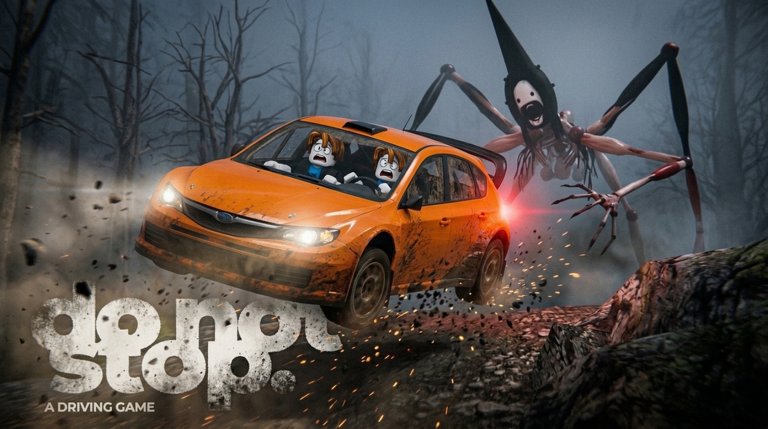
The game description notes that Do Not Stop takes inspiration from analog horror conventions:
- Visual Appearance: Promotional key art and in-game cockpit frames show a tall, dark humanoid figure with elongated limbs pursuing the vehicle.
- Pursuit Role: The entity follows on foot along the roadway, matching vehicle speed and overtaking the car when speed drops significantly.
The Runner vs Steeple: Name Origins
Official documentation uses two distinct terms:
| Name | Official Sourcing | Where It Appears |
|---|---|---|
| The Runner | Official Roblox Survival Badges | Badge descriptions for Route 1610 state: You reached the shelter at the end of Route 1610 with the Runner behind you. In-game loading text also states: One car. The Runner doesn't wait. |
| Steeple | Developer Event Announcements | Official event logs for Update 2 state: Steeple has followed you after you escaped and Steeple is as close as ever. |
While player discussions often treat Steeple and the Runner as the same entity, the developer has not published an official lore document establishing whether Steeple is a specific character name or a broader classification.
In-Game Interactions and Emergency Responses
The entity interacts with your vehicle through specific mechanics:
- Pursuit on the Highway: The chaser trails your vehicle. If your speed drops significantly due to collisions, missed corners, or braking, the chaser overtakes your car and triggers
SIGNAL LOST. - Passenger Radar Detection: On duo runs, the co-driver console detects rear proximity, displaying tracking indications on the DISTANCE dial.
- Window Alerts: During segments of a run, the entity appears outside the window alongside a flashing red banner reading
SOMETHING'S AT YOUR WINDOWorWARNING IT'S AT YOUR WINDOW. When this happens, holdFto raise the shutter. Review complete defense steps on /guides/window-shutter.
What Happens When You Are Overtaken
If the chaser catches you, the run transitions to the SIGNAL LOST debrief:
- The screen records the exact mile marker of capture.
- You can restart from Mile 0 or spend an available checkpoint retry to resume from your last passed roadside mile sign. Read recovery advice on /guides/signal-lost-and-retries.
- The developer's Update 2 announcement teases that Steeple will pursue players across new terrain types; read the schedule on /updates/update-2-tournament.
To test your driving against the chaser, pick your starting highway on /maps.