Key Differences Between Solo and Duo Runs
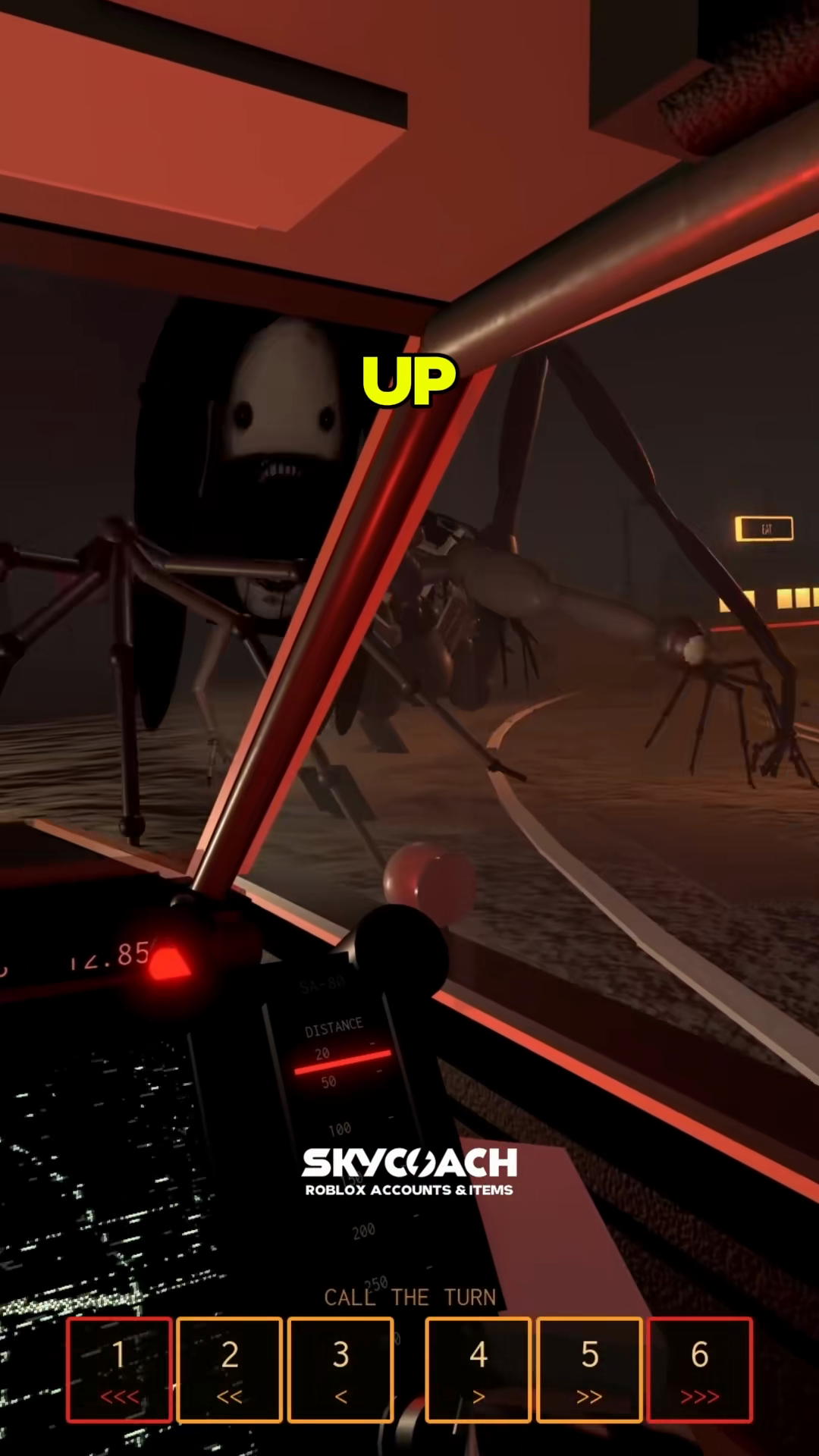
The passenger cockpit view below shows the DISTANCE scanner and the six turn callout buttons.
Review how responsibilities divide between solo and duo formats:
| Feature | Solo Run (Drive Alone) | Duo Run (Driver + Passenger) |
|---|---|---|
| Turn Navigation | Automated turn indicator box reported at top-center of the windshield | Passenger reads the radar scanner and presses buttons 1 to 6 to signal upcoming turns |
| Steering and Drifting | You control throttle, brakes, and Space drifts | Driver controls all vehicle movement |
| Window Defense | Driver holds F while keeping the car on the road |
Follow on-screen shutter prompts as they appear |
| Communication Needs | None; self-reliant | High; requires agreed-upon callout vocabulary before departure |
| Common Failure Points | Dividing attention between road turns and window alerts | Miscommunication or late turn calls leading to spinouts |
While the official Roblox experience page lists a 30-player server limit, this figure represents the total player capacity of the lobby instance. Each car holds a maximum of two players: one Driver and one Passenger.
Driving Solo: What to Expect
To run solo, step onto an empty launch pad in the lobby and select Drive Alone.
- Navigating the route: In solo runs, player reports describe a small directional icon near the top-center of the windshield above the mile counter. As you approach a curve, this icon indicates the direction the road turns.
- Managing split attention: Without a passenger calling out corners, you must rely on roadside cues and reaction time. When the red window alert flashes, hold down
Fwhile maintaining your steering line with gentle adjustments. - Practice advantage: Solo play lets you restart quickly without waiting for a partner, making it convenient for learning Route 1610 fundamentals.
Running With a Passenger: Splitting Responsibilities
The documented launch sequence begins on an open lobby pad: select your route using the route arrows, choose Invite to pair with a partner, and confirm the Driver and Passenger role slots before leaving the lot.
- The Passenger Console: The passenger sits on the right side of the cabin facing the navigation dashboard, which includes a
DISTANCEscanner and a numbered keypad labeledCALL THE TURN. - Turn Buttons 1 Through 6: Keys 1, 2, and 3 correspond to left turns from sharp to gentle (
<<<,<<,<). Keys 4, 5, and 6 correspond to right turns from gentle to sharp (>,>>,>>>). Learn the complete symbol breakdown in /guides/passenger-radar-callouts. - Agree on Callout Words: Before departing, establish simple verbal terms over voice chat. Simple phrases like "Hard Left" for button 1 and "Gentle Right" for button 4 work better than reciting raw numbers.
- Window Defense Alerts: When the red alert warns of an entity at the window, the passenger can verbally remind the driver to hold
Fwhile keeping eyes on the road. Follow the prompt instructions in /guides/window-shutter.
Clear communication makes duo runs effective on winding mountain highways like Misty Mountain Pass. If you are preparing for your first joint run, read /guides/beginner-guide.